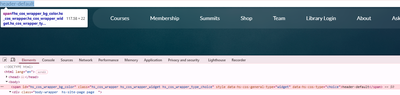
I am working in a base HTML template and trying to use a template choice field to dynamically add a CSS class to my body wrapper.
This is the field definition I am using:
{% choice “bg_color” label=”Select Header Background Color”, value=”header-default”, choices=”[[“header-blue”, “Blue”], [“header-white”, “White”], [“header-default”, “Default”]]”, export_to_template=true %}
Instead of the class being added to the element, HubSpot is rendering the field value as visible text at the top of the page inside a span wrapper.
My goal is to use the selected value only as a class and not have it output any visible markup.
What is the correct way to reference a template choice field so it can be used purely as a class value without rendering text on the page?
Any guidance would be appreciated.